
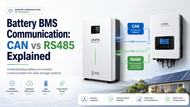
Battery BMS Communication: CAN vs RS485 Explained
Posted by LIMIOTECH on Jul 21st 2026
Battery BMS communication is one of the most overlooked parts of a solar storage system. Buyers often compare battery capacity, voltage, cycle life, and price first. Those details matter, but the battery also needs to communicate correctly with the inverter if the system is expected to charge, discharge, protect itself, and display data accurately.
For LiFePO4 batteries, two communication options appear again and again: CAN and RS485. Both can support battery-to-inverter communication, but they are not the same thing. They use different electrical interfaces, different wiring expectations, and often different communication protocols.
That is why a battery and an inverter can both mention CAN or RS485 and still not be automatically compatible. The port is only one part of the story. The communication protocol, cable pinout, inverter profile, firmware version, master battery setup, and battery management system settings all matter.
This guide explains how CAN and RS485 work in battery energy storage systems, what information a BMS shares with an inverter, and what homeowners, installers, and system designers should check before choosing a LiFePO4 battery for solar backup or off-grid power.
Quick Answer: CAN vs. RS-485 for Battery BMS Communication
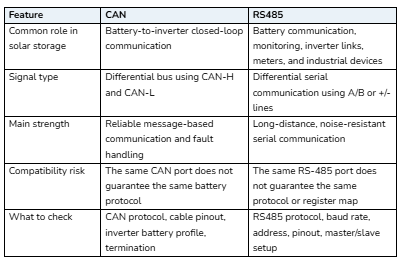
CAN and RS485 are both used for BMS communication between lithium batteries and solar inverters. CAN is commonly used for closed-loop inverter communication because it is fast, robust, and designed for multiple devices sharing a bus. RS485 is widely used in solar and industrial systems because it supports differential signaling, long cable runs, and common protocols such as Modbus-style communication.
In practical solar storage systems, neither one is automatically “better” in every situation. The best option is the one supported by both the battery BMS and the inverter with the correct protocol, cable, pinout, firmware, and configuration.
What Is a Battery BMS?
A battery management system, or BMS, is the control and protection system inside a lithium battery pack. It monitors battery voltage, current, temperature, state of charge, cell balance, and fault conditions. In a basic setup, the BMS may only protect the battery internally. In a smarter solar storage setup, the BMS can also communicate with the inverter.
That communication helps the inverter understand the battery’s real operating limits instead of relying only on fixed voltage settings. This is especially important with LiFePO4 batteries because their voltage curve is relatively flat across much of the state-of-charge range. Voltage alone does not always show battery percentage accurately.
A communicating BMS may share useful data such as:
- State of charge
- State of health
- Battery voltage
- Battery current
- Battery temperature
- Charge voltage limit
- Charge current limit
- Discharge current limit
- Battery alarms and fault warnings
- Cell or module protection status
When communication works correctly, the inverter can reduce charging, stop discharging, show better battery data, and react to BMS protection limits more intelligently.
BMS Communication Is Not the Same as Power Wiring
Battery power cables and BMS communication cables do different jobs. The positive and negative DC cables carry power between the battery and the inverter. The communication cable carries data. A system may have correct power wiring but still fail to communicate if the data cable, pinout, protocol, or inverter setting is wrong.
This is a common installation mistake. A battery can often charge and discharge in open-loop voltage mode, but that does not mean closed-loop communication is active. If the inverter is not receiving BMS data, it may not display the correct state of charge, may use generic charging parameters, or may trigger a communication fault.
What Is CAN BMS Communication?
CAN stands for Controller Area Network. In battery storage systems, CAN is often used to let a battery BMS send operating limits and status messages to an inverter or system controller.
CAN communication usually uses two signal lines, commonly labeled CAN-H and CAN-L. It is a differential communication method, which helps with noise resistance. It is also message-based, meaning devices send structured data frames rather than simple point-to-point text messages.
In solar storage, CAN is popular because many hybrid inverters and lithium battery integrations rely on closed-loop CAN communication. When a battery is compatible with an inverter’s CAN profile, the inverter can receive battery status, limits, alarms, and charging instructions directly from the BMS.
Advantages of CAN for Solar Batteries
- Strong fit for closed-loop battery and inverter communication.
- Good noise resistance when wired correctly.
- Message-based design that supports structured battery data.
- Common on many modern LiFePO4 batteries and hybrid inverters.
- Useful for sharing charge and discharge limits in real time.
Common CAN Compatibility Issues
- Wrong cable pinout between the battery and the inverter.
- Wrong inverter battery profile selected.
- Battery firmware does not match the inverter firmware.
- CAN port present, but the protocol is not supported by the inverter.
- Missing or incorrect termination in some bus configurations.
- The master battery is not set correctly in a multi-battery bank.
This is why the phrase “CAN supported” is not enough. The exact battery-inverter integration must be verified.
What is RS-485 BMS Communication?
RS485 is a differential serial communication interface used widely in industrial, monitoring, inverter, meter, and battery systems. In solar energy storage, RS485 may be used for battery communication, monitoring devices, meters, and inverter accessories.
RS485 is valued because it is noise-resistant and can support longer cable runs than simpler serial connections when installed correctly. However, RS485 describes the electrical communication interface. The actual data still needs a compatible protocol, device address, baud rate, and message structure.
In battery systems, RS485 may be used for closed-loop communication with some inverters, for battery-bank communication between modules, or for monitoring battery data through a computer, gateway, or energy-management device.
Advantages of RS485 for Solar Batteries
- Widely used in solar, industrial, and monitoring equipment.
- Good noise resistance over twisted-pair cabling.
- Can support longer communication runs when designed correctly.
- Useful for battery monitoring, meters, and multi-device communication.
- Often used with address-based communication in multi-device systems.
Common RS485 Compatibility Issues
- A and B signal lines are reversed.
- Incorrect baud rate or communication address.
- The inverter expects a different RS485 protocol.
- The battery register map does not match the inverter profile.
- Wrong cable pinout on RJ45-style connectors.
- Multiple batteries are not assigned correctly in master/slave mode.
Just like CAN, RS485 should not be judged only by the port label. The protocol and configuration matter just as much as the hardware interface.
CAN vs. RS-485: Which One Is Better?
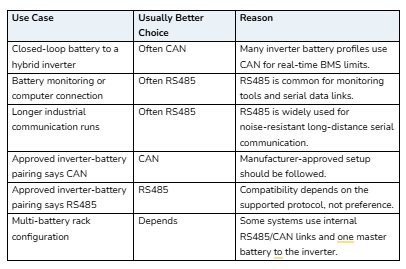
For solar battery storage, the better choice depends on the inverter and battery combination. If the inverter’s approved battery list or installation guide requires CAN for a specific battery, use CAN. If the system is designed around RS485 communication, use RS485. If both are supported, follow the battery and inverter manufacturer’s preferred integration method.
In many modern hybrid inverter setups, CAN is often preferred for direct battery-to-inverter closed-loop communication. RS485 remains extremely useful for monitoring, meters, battery-bank communication, and systems where the inverter specifically supports the battery over RS485.
Closed-Loop vs Open-Loop Battery Communication
Closed-loop communication means the battery BMS actively shares data with the inverter. The inverter can respond to battery limits instead of relying only on fixed voltage points. This can improve charging accuracy, protection response, monitoring, and user visibility.
Open-loop operation means the inverter works from programmed voltage, current, and time settings without receiving detailed BMS data. Open-loop can still work in some systems, but it requires careful settings and does not provide the same direct battery feedback.
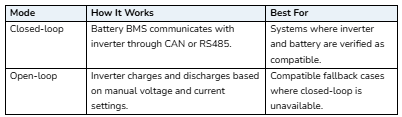
For most buyers, closed-loop communication is preferable when the battery and inverter are properly matched. But incorrect closed-loop settings can cause more problems than a carefully configured open-loop setup. Compatibility should always come first.
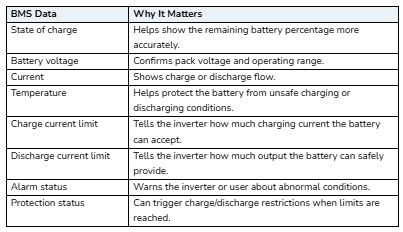
What Information Does the Battery Send to the Inverter?
The exact data depends on the battery model, inverter, and protocol. However, a communicating BMS commonly sends data that helps the inverter operate within safe limits.
Why Protocol Compatibility Matters More Than the Port Name
A CAN port or RS485 port is like a road. The protocol is the language being spoken on that road. Two devices can have the same type of road but still fail to understand each other if they use different languages.
This is especially important for cross-brand solar setups. A battery may support CAN, and an inverter may also support CAN, but the inverter still needs to understand that battery’s message format. The same is true for RS485. A matching connector does not guarantee a matching protocol.
Before buying a battery or inverter, check these details:
- Does the inverter list the battery brand or model as supported?
- Does the battery manual list the inverter brand or protocol?
- Which port should be used: CAN, RS485, or another interface?
- Is a special communication cable required?
- What is the correct RJ45 pinout?
- What inverter battery profile should be selected?
- Are firmware updates required?
- Does the system need a DIP switch or address settings?
Battery Banks: Master, Slave, and Address Settings
Many LiFePO4 storage systems use more than one battery module. In that type of setup, one battery may act as the master battery while the others act as slave batteries. The inverter may communicate only with the master battery, while the master gathers information from the rest of the battery bank.
This setup often requires correct address settings, DIP switch positions, communication cables between modules, and a final communication cable from the master battery to the inverter. If one battery has the wrong address or the master battery is not configured correctly, the system may show missing modules, incorrect capacity, or communication faults.
For larger residential or small commercial banks, this step is just as important as choosing the right battery capacity.
LINIOTECH Example: Why This Matters in Real Systems
LINIOTECH offers LiFePO4 battery and inverter products where communication is part of the system design. For example, the LINIOTECH 15kVA hybrid inverter all-in-one system lists RS485/CAN communication interfaces for BMS integration, which makes communication compatibility a key buying and installation factor.
The LINIOTECH 10kWh 51.2V LiFePO4 Power Reserve wall battery is part of the residential storage ecosystem, where battery capacity, voltage, inverter pairing, and BMS communication should be checked together.
For modular battery-bank planning, buyers can also review LINIOTECH rack LiFePO4 battery module options and match the battery setup to the inverter, cable requirements, and communication method before installation.
What Happens If BMS Communication Fails?
A communication issue does not always mean the battery is defective. It may be caused by a cable, profile, setting, address, firmware, or protocol mismatch. Common symptoms include:
- The inverter shows a BMS communication fault.
- Battery percentage does not display correctly.
- The battery appears connected but does not charge normally.
- The inverter limits charging or discharging unexpectedly.
- Battery modules do not appear in the monitoring screen.
- The system works in voltage mode but not closed-loop mode.
- State of charge jumps or reads inaccurately.
Troubleshooting should start with the manual, approved compatibility list, correct cable, correct port, inverter battery profile, battery address settings, and firmware version.
CAN vs. RS-485 Buying Checklist
Before choosing a LiFePO4 battery for a solar inverter, use this checklist:
- Confirm the inverter supports the selected battery model.
- Confirm whether the approved connection uses CAN or RS485.
- Check if the cable is standard or manufacturer-specific.
- Verify the pinout before connecting the communication cable.
- Set the correct inverter battery profile.
- Set battery DIP switches or addresses exactly as required.
- Update firmware if the manufacturer recommends it.
- Confirm whether the system supports closed-loop communication.
- Check battery charge and discharge limits after communication is active.
- Keep the installation manual available for future troubleshooting.
Common Mistakes to Avoid
Mistake 1: Assuming the Same Port Means Compatibility
CAN-to-CAN or RS-485-to-RS-485 does not guarantee communication. The protocol must also match.
Mistake 2: Using the Wrong RJ45 Cable
Many battery and inverter communication ports use RJ45-style connectors, but the pinout may not match a normal Ethernet cable. Always check the wiring guide.
Mistake 3: Forgetting the Master Battery Setting
In a multi-battery bank, the inverter may communicate with only the master battery. Wrong address settings can break the whole communication chain.
Mistake 4: Ignoring Firmware Versions
Some compatibility improvements depend on firmware. A system that should work on paper may need updated firmware to communicate correctly.
Mistake 5: Treating Communication as Optional in a Smart System
Some systems can operate open-loop, but many modern hybrid setups perform better when closed-loop BMS communication is configured correctly.
How to Choose the Right Battery and Inverter Combination
The safest approach is to treat the battery and inverter as one system. Do not choose a battery only because the voltage and capacity look right. Also, check the communication method, approved compatibility, charge/discharge limits, battery profile, and installation documentation.
For a residential backup system, that may mean checking whether the inverter can read the battery’s state of charge and adjust charging behavior. For a commercial or industrial storage system, it may also mean checking how the battery communicates with the inverter, EMS, monitoring portal, meters, and site controller.
LINIOTECH provides broader residential energy storage solutions and industrial and commercial energy storage solutions where battery capacity, inverter output, system voltage, and communication compatibility should be planned together.
Final Thoughts
CAN and RS485 both play important roles in solar battery BMS communication. CAN is often used for closed-loop battery-to-inverter communication, while RS485 remains widely used in battery monitoring, inverter systems, meters, and industrial communication setups.
The most important lesson is simple: do not judge compatibility by the port name alone. A working system needs the right communication interface, the right protocol, the right cable, the right inverter profile, the right battery settings, and the right firmware.
When those pieces match, BMS communication helps the inverter operate with better battery visibility, safer charging behavior, and stronger system control. When they do not match, even a high-quality battery and inverter can show faults or fail to communicate.
For a complete solar storage setup, explore LINIOTECH energy solutions and match your battery, inverter, solar array, and communication requirements as one connected system.
FAQs
What is BMS communication?
BMS communication is the data connection between a battery management system and another device, such as an inverter, monitor, or energy-management system. It lets the battery share status, limits, alarms, and protection information.
What is the difference between CAN and RS485?
CAN is a message-based bus commonly used for closed-loop battery-to-inverter communication. RS485 is a differential serial interface widely used in industrial and solar equipment. Both can work well when the protocol and configuration match.
Is CAN better than RS485 for lithium batteries?
Not always. CAN is often preferred for modern closed-loop inverter communication, but RS485 is also widely used. The better option is the one approved for your specific battery and inverter combination.
Can I use a normal Ethernet cable for battery communication?
Not unless the manufacturer says the pinout is compatible. Many battery and inverter ports use RJ45 connectors, but the wiring can be different from standard Ethernet.
Why does my inverter show a BMS communication fault?
Common causes include the wrong communication cable, wrong port, reversed RS485 lines, wrong CAN pinout, incorrect inverter battery profile, the wrong battery address, or unsupported protocol.
Can a battery work without BMS communication?
Some systems can operate in open-loop voltage mode, but this depends on the inverter and battery. Closed-loop communication usually provides better battery visibility and control when the system is compatible.
Does RS485 always mean Modbus?
No. RS485 is an electrical interface. Modbus is one common protocol that can run over RS485, but not every RS485 battery connection uses the same protocol or register map.
What data does a battery BMS send to the inverter?
A BMS may send state of charge, voltage, current, temperature, charge current limits, discharge current limits, alarms, and protection status.
Can I mix batteries with different BMS communication?
Mixing batteries is risky unless the manufacturer supports the exact configuration. Different BMS protocols, firmware, capacities, voltages, and settings can create communication and safety issues.
What should I check before buying a LiFePO4 battery?
Check voltage, capacity, discharge current, certifications, warranty, inverter compatibility, CAN or RS485 support, protocol, cable pinout, and whether the inverter lists the battery as approved.